About this 3D model
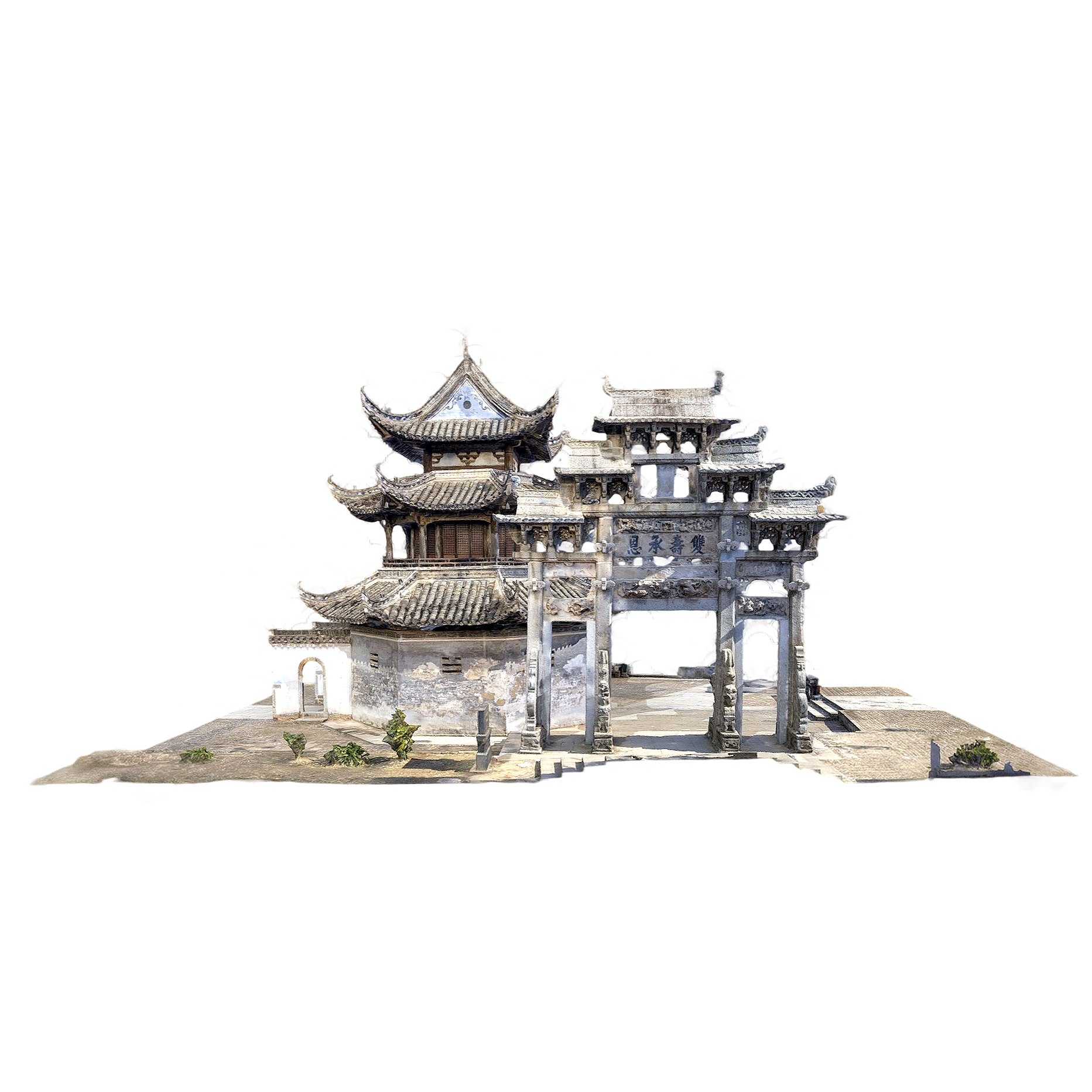
Grand View Pavilion and Shuangshou City Square is a downloadable Building asset on Freecreat. Preview it online, inspect tags and formats, and open the download page when you are ready to use the model files.
Use the download package in Blender, C4D, Unity, Vision Pro or iPad AR workflows.

Daguan Pavilion is located on the north side of Gaoyang Langqiao, Xu Village, Shexian County, Anhui Province. It was built in the 30th year of Jiajing of the Ming Dynasty (1557) and is a three-story brick-wood structure pavilion-style building. The ground floor of the building is octagonal, covering an area of 64.6 square meters. It is built across the street to form a north-south passage, which has both traffic and rest functions. The existing main structure integrates Ming and Qing construction techniques, and the project of reducing dryness and improving fire fighting capacity will be implemented in 2022, which will remain intact after heavy rain in 2024. It is now a provincial-level key cultural relic protection unit in Anhui Province, and has been included in the national key cultural relic protection unit system as the core component of the Xucun ancient building complex.
Grand View Pavilion and Shuangshou City Square is a downloadable Building asset on Freecreat. Preview it online, inspect tags and formats, and open the download page when you are ready to use the model files.
Available formats include BLEND, FBX, GLB, GLTF, OBJ, STL. The package may include source files, geometry, materials or textures depending on the archive.
This model is useful for 3D preview, spatial scenes, AR viewing, Architecture, Building 3D model, Historical architecture and creative reference workflows.
These tag hubs are selected from models that share similar tag relationships with this asset.
 Church of the Sacred Heart of Bytom, Poland3 credits
 Model of the Sacrificial Banquet House (Nayarit region)3 credits
 Dyer Abbey3 credits
 chalet villa3 credits
 Concrete Building3 credits
 Spanish Stone Building Site (Corral Agreret)5 credits
 The bell tower of a Japanese temple3 credits
 Japanese traditional architecture3 credits
 3D model of traditional Chinese architecture (support mobile AR, Vision Pro view)3 credits
 Brown Rock Villa and Its Garden5 credits
 Church of Saint Eulalia3 credits
 The old church of Santa Ana de la Joya3 credits
  Horses (3D animated model)3 credits
 Wild Boar (3D animated model)3 credits
 Hare (3D animated model)3 credits
 Ring-necked pheasant (3D animated model)3 credits
 Goat (3D animated model)3 credits
 Moose (3D animated model)3 credits
 Lion (3D animated model)3 credits
 Hyena (3D animated model)3 credits
 White Horse (3D animated model)3 credits
 Goat (3D animation model)3 credits
 Golden Spot Butterfly (3D animated model)2 credits
 Honey Badger (3D animated model)3 credits
  Industrial wind cement hollow brick wood combination rack TV cabinet 3D model2 credits
 Old yellow paint fire hydrant3 credits
 The Royal Tomb of the Ancient City of Petra, Jordan5 creditsChurch of the Sacred Heart of Bytom, Poland3 credits
 Model of the Tomb of the Tower of Palmira3 creditsDyer Abbey3 creditschalet villa3 credits
 Chinese Lingnan Traditional Brick Carving5 creditsConcrete Building3 credits
 3D Model Rendering of the Great Hall of Jinshan Temple3 credits
 Simple Metal Shed3 credits
 a pile of firewood2 credits
 Freecreat supports common 3D formats such as OBJ, FBX, GLTF, STL, USDZ, GLB, 3DMAX, 3DS, MAX, C4D and Blender when they are included in the package.
You can open the files with tools such as Blender, Maya, 3ds Max, Cinema 4D, SketchUp or ZBrush. STL is commonly used for slicing, while GLB and USDZ are suitable for lightweight viewing and AR.
If the package includes a printable STL or compatible mesh, you can prepare it in slicing software before printing. Please check scale, wall thickness and mesh integrity first.
Yes. The page supports online 3D preview, mobile AR viewing and XR headset experiences for inspecting model details in spatial devices.
When textures or materials are available, the package will keep the related assets as much as possible. The final contents depend on the downloaded archive.
Please follow the creator license, Freecreat terms and any page-specific notes. Do not redistribute, resell or use commercially without proper permission.
Different software handles units, texture paths and material nodes differently. Check unit scale, texture paths, normal direction and import settings first.
Yes. Use the AR entry on the page or open the model on a compatible mobile device to view it in augmented reality.
Use the support entry on the page or contact us at 77635564@qq.com.
| 3D Studio (.3ds) | 3DS MAX v.2018-24 Arnold (.max) | 3DS MAX v.2011-24 Corona (.max) |
| 3DS MAX v.2011-24 Maxwell (.max) | 3DS MAX v.2008-24 Mental Ray (.max) | 3DS MAX v.2008-24 Scanline (.max) |
| 3DS MAX v.2008-24 V-Ray (.max) | Autodesk Drawing (.dxf, .dwg) | Autodesk FBX (.fbx) |
| Blender v.2.6- 3.0 (.blend) | Cinema 4D v.11-25 (.c4d) | Cinema 4D V-Ray v.11-25 (.c4d) |
| Collada (.dae) | DAZ Studio (.duf) | Element 3D AfterEffects CS3-CC (.aep) |
| GLB file (.glb) | glTF 2.0 file (.gltf) | Keyshot (.bip) |
| Lightwave v.6-2024 (.lwo) | Maxwell studio (.mxs) | Maya v.2017 - 2024 Arnold (.mb) |
| Maya v.2011 - 2024 Mental Ray (.mb) | Maya v.2011 - 2024 V-Ray (.mb) | Maya v.8.5 - 2024 (.mb) |
| Photoshop CS3-CC (.psd) | Rhinoceros 3D v.4-7 (.3dm) | Sketchup v.6-2024 (.skp) |
| Softimage (.xsi) | Stereolithography (.stl) | Universal Scene Description (.usd) |
| USDZ file (.usdz) | Wavefront OBJ (.obj) |